> ## Documentation Index
> Fetch the complete documentation index at: https://dtexplorer.io/llms.txt
> Use this file to discover all available pages before exploring further.
# Introduction
> Load, explore, preview, check adoption, and insert design tokens directly in VS Code.
 ## What is Design Tokens Explorer?
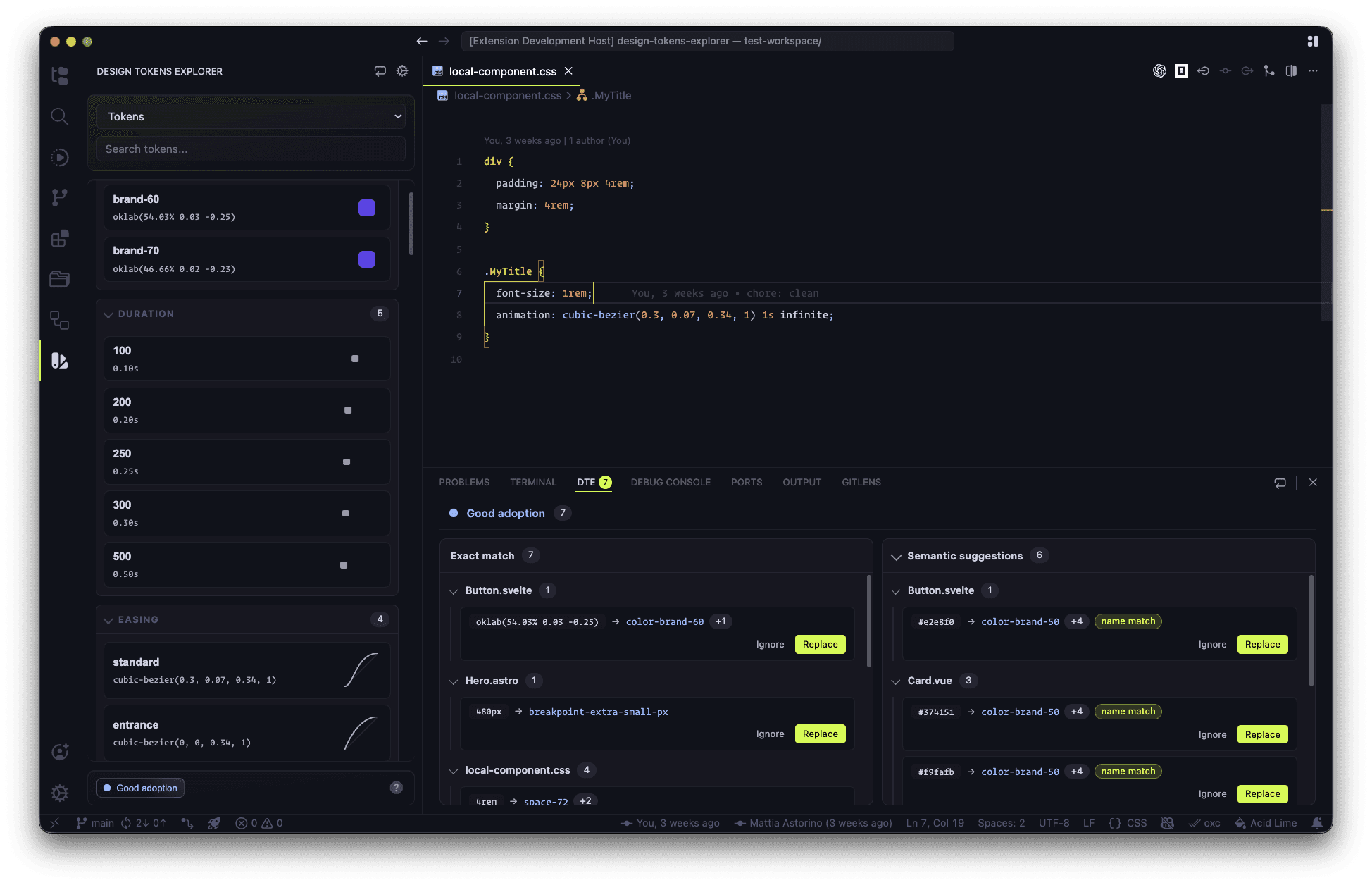
**Design Tokens Explorer** is a VS Code extension by [Vira Software](https://vira.build) that bridges the gap between your design system and your codebase. It lets you load tokens from any source, browse and preview them visually, insert them at the cursor with language-aware formatting, and audit your code for hardcoded values that should be replaced with tokens.
Get up and running in minutes
Configure local files and remote URLs
Find and replace hardcoded values
Insert tokens with language-aware formatting
## Features
### Browse your design system
The **Design Tokens Explorer** sidebar lets you navigate all your token sources at once. Tokens are organized into collapsible groups by category (colors, spacing, typography, etc.) with an integrated search that filters across all sources.
### Visual previews
Each token type renders a visual preview directly in the panel — color swatches, spacing bars, radius demos, cubic-bezier easing curves, and more — so you never have to guess what a value looks like.
### Context-aware insertion
Click a token to insert it at the cursor. The extension automatically formats the insertion based on the language of the active file: `var(--token-name)` in CSS/SCSS/Less, a quoted string in JS/TS, and so on. You can also configure a custom insert format.
### Hardcoded values audit
The **DTE Hardcoded Values** panel scans your workspace for literal values that match token values. It shows where they appear, suggests the correct token to use, and lets you replace or ignore them with a single click.
### Autocomplete
As you type `var(--` in a CSS file, Design Tokens Explorer provides autocomplete suggestions for all loaded tokens with their values shown inline.
### Multiple sources
Load tokens from multiple files or URLs in parallel. Each source appears as a separate panel in the sidebar, letting you navigate a multi-package design system without losing context.
## Token formats supported
| Format | Local | Remote |
| --------------------------------------------------------------------- | ----- | ------ |
| CSS custom properties (`:root {}` / `:where(html) {}` / `@theme {}`) | ✓ | ✓ |
| SCSS custom properties (`:root {}` / `:where(html) {}` / `@theme {}`) | ✓ | ✓ |
| JSON (flat or nested) | ✓ | ✓ |
| JavaScript / TypeScript exports | ✓ | — |
## Trial and licensing
Design Tokens Explorer includes a **7-day free trial** that activates automatically on first install. After the trial period, a license key is required to continue using the extension. You can activate or deactivate a license directly from the VS Code command palette.
## What is Design Tokens Explorer?
**Design Tokens Explorer** is a VS Code extension by [Vira Software](https://vira.build) that bridges the gap between your design system and your codebase. It lets you load tokens from any source, browse and preview them visually, insert them at the cursor with language-aware formatting, and audit your code for hardcoded values that should be replaced with tokens.
Get up and running in minutes
Configure local files and remote URLs
Find and replace hardcoded values
Insert tokens with language-aware formatting
## Features
### Browse your design system
The **Design Tokens Explorer** sidebar lets you navigate all your token sources at once. Tokens are organized into collapsible groups by category (colors, spacing, typography, etc.) with an integrated search that filters across all sources.
### Visual previews
Each token type renders a visual preview directly in the panel — color swatches, spacing bars, radius demos, cubic-bezier easing curves, and more — so you never have to guess what a value looks like.
### Context-aware insertion
Click a token to insert it at the cursor. The extension automatically formats the insertion based on the language of the active file: `var(--token-name)` in CSS/SCSS/Less, a quoted string in JS/TS, and so on. You can also configure a custom insert format.
### Hardcoded values audit
The **DTE Hardcoded Values** panel scans your workspace for literal values that match token values. It shows where they appear, suggests the correct token to use, and lets you replace or ignore them with a single click.
### Autocomplete
As you type `var(--` in a CSS file, Design Tokens Explorer provides autocomplete suggestions for all loaded tokens with their values shown inline.
### Multiple sources
Load tokens from multiple files or URLs in parallel. Each source appears as a separate panel in the sidebar, letting you navigate a multi-package design system without losing context.
## Token formats supported
| Format | Local | Remote |
| --------------------------------------------------------------------- | ----- | ------ |
| CSS custom properties (`:root {}` / `:where(html) {}` / `@theme {}`) | ✓ | ✓ |
| SCSS custom properties (`:root {}` / `:where(html) {}` / `@theme {}`) | ✓ | ✓ |
| JSON (flat or nested) | ✓ | ✓ |
| JavaScript / TypeScript exports | ✓ | — |
## Trial and licensing
Design Tokens Explorer includes a **7-day free trial** that activates automatically on first install. After the trial period, a license key is required to continue using the extension. You can activate or deactivate a license directly from the VS Code command palette.